Case study 02 / 04 · Order Addendum
CASE STUDY 02 / 04
Interaction designUI designGovTech

Change an order’s quantity without cancelling the PO, and stay within the rules.

Order Addendum lets government buyers on Mbizmarket increase or reduce quantities on an order that’s already running. The seller just accepts or declines, and the addendum document writes itself.

Role
Lead UI/UX Designer
Platform
Web · mobile · admin panel
Users
Buyers, sellers, admins
Regulation
Perpres 46/2025, Art. 54
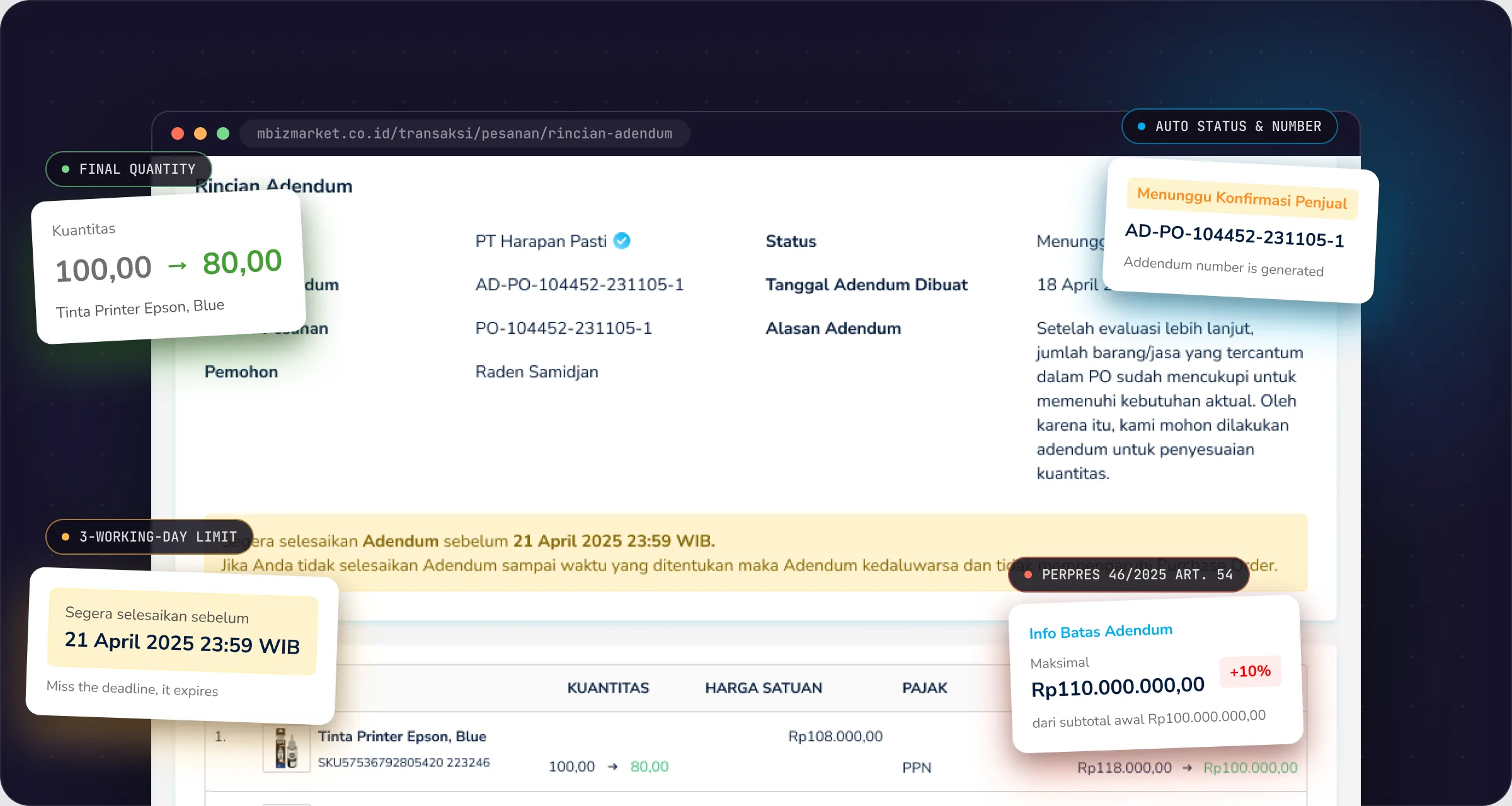
Order Addendum: annotated product screen

Real screen from the Addendum design file. All company and user data is fictional.

The 30-second version
The problem

The only way to change a running order was to cancel it and reorder, even when part of the goods had already shipped.

What I did

One request with a final-quantity field, the legal +10% limit shown before you hit it, a simple accept-or-decline for sellers, and an auto-generated, e-signed document.

The result

No more cancel-and-reorder just to change a quantity, with every change on record and capped by the regulation.

Impact

From cancel-and-reorder to one tracked request.

BEFORECancel the PO, then reorder from scratch
Rp7.8B

in orders that didn’t need to be cancelled, because the quantity can change on the same PO.

BEFOREAgreed in chat, paperwork by hand
−4 days

of admin per addendum: paper and wet signatures became a generated document with e-signatures.

BEFOREWorking out the limit by hand
3 min

on average to fill in a request, because the +10% cap is visible right in the form.

The numbers behind Addendum
340+addendums submitted since launch
−35%POs cancelled just to change a quantity
78%accepted by the seller before expiry
2.1 daysaverage seller response, within the 3-working-day limit
Who it’s for

One change, three parties who need to know.

Government orders often need adjusting once they’re running: what arrived turns out to be enough, or the need grows. Before Addendum, the only option was to cancel and reorder, even when part of the goods had already shipped.

B

Buyers

Commitment officers or managers who request the change.

S

Sellers

Store admins who accept or decline within a deadline.

M

Mbizmarket admins

Keep an eye on every addendum from the admin panel.

The problem

Changing a contract that’s already moving.

An addendum isn’t just editing a number. The order may be in transit, some goods already received, an invoice already out, and any change to a government contract’s value is capped by regulation. The design had to keep this safe for both sides and still auditable.

Regulation

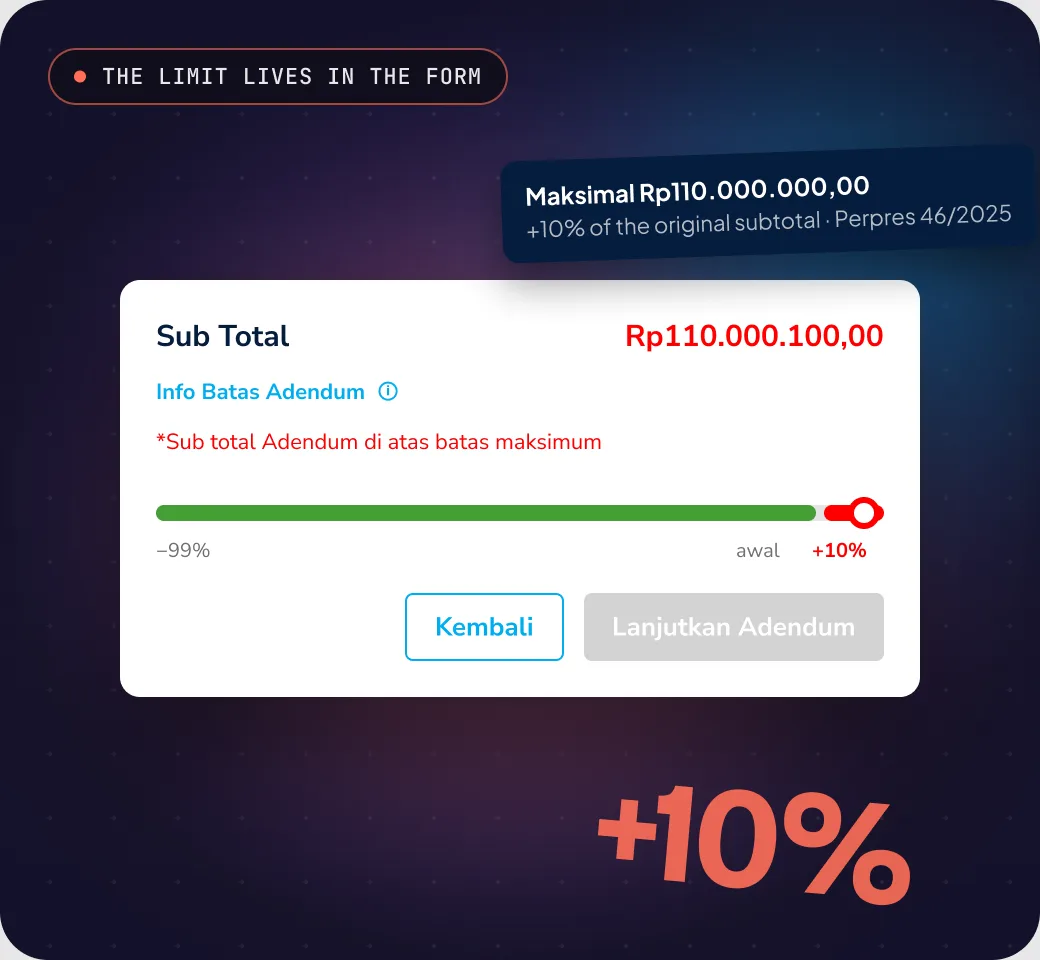
Value changes are capped at +10% of the subtotal

Under Perpres 46/2025, Article 54. The rule doesn’t cap reductions, so the system limits them to 99%.

Live orders

Some goods may already be shipped or received

The new quantity can’t go below what’s been received, and shipping and invoices have to follow once it’s agreed.

Two parties

The seller has to agree within a deadline

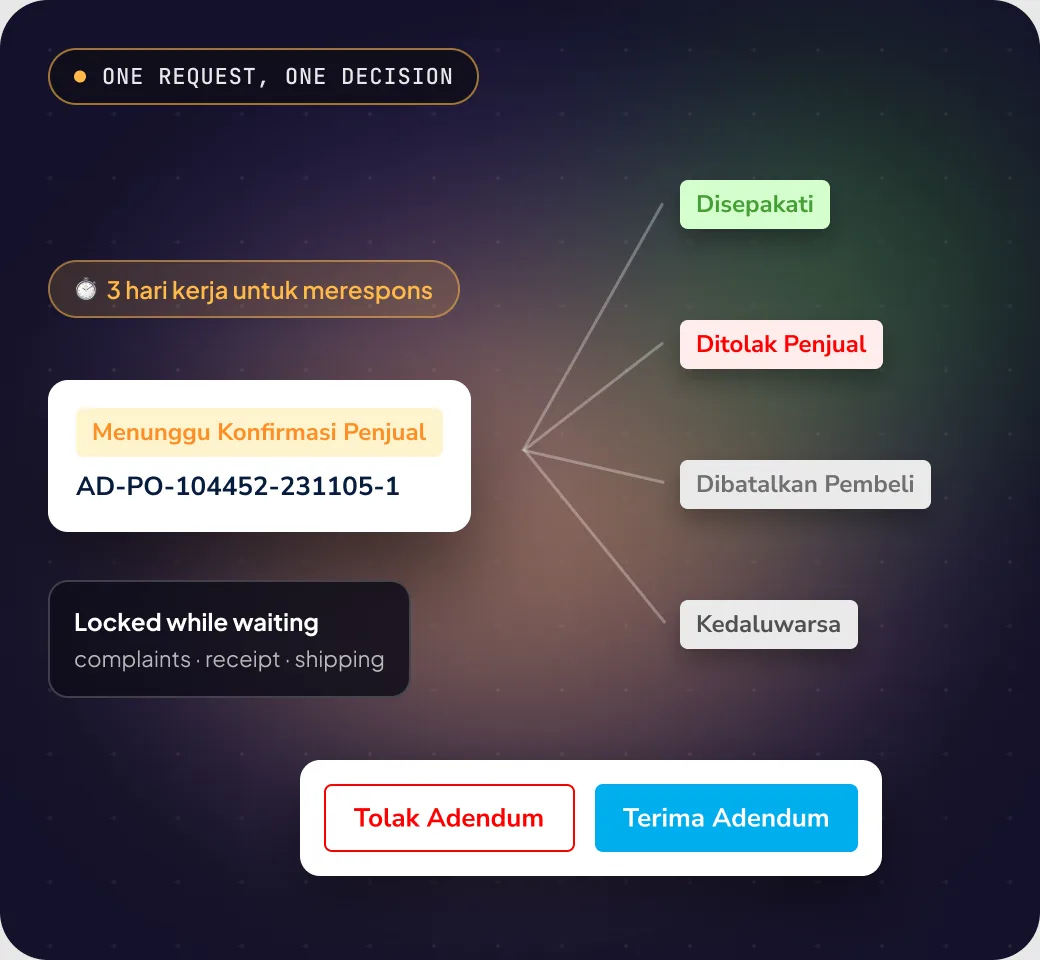
While it’s pending, other actions on the order are locked so data doesn’t collide, like complaints or receipt confirmation.

Who wins

One feature, three winners.

Buyers adjust orders without starting over, sellers just decide, and Mbizmarket keeps deals moving on the platform.

Government buyers

Adjust an order without starting over.

3×faster than cancelling and reordering
  • Request straight from the order detail page
  • Type the final quantity, with what’s already received in view
  • See the maximum value before you submit
  • Cancel any time before the seller responds
Sellers

A clear decision, no side-channel haggling.

85%of sellers respond within 3 working days
  • Email to every store admin on each status change
  • Changed items flagged with a green arrow
  • The response deadline is always visible
  • Order and invoice update themselves once agreed
Mbizmarket

Deals keep moving, and stay auditable.

−12%support tickets about changing or cancelling orders
  • No need to cancel and reorder
  • Addendum documents with e-signatures
  • Every status change lands on the order timeline
  • Admins monitor everything from the admin panel
Key decisions

Four decisions that shaped Addendum.

01

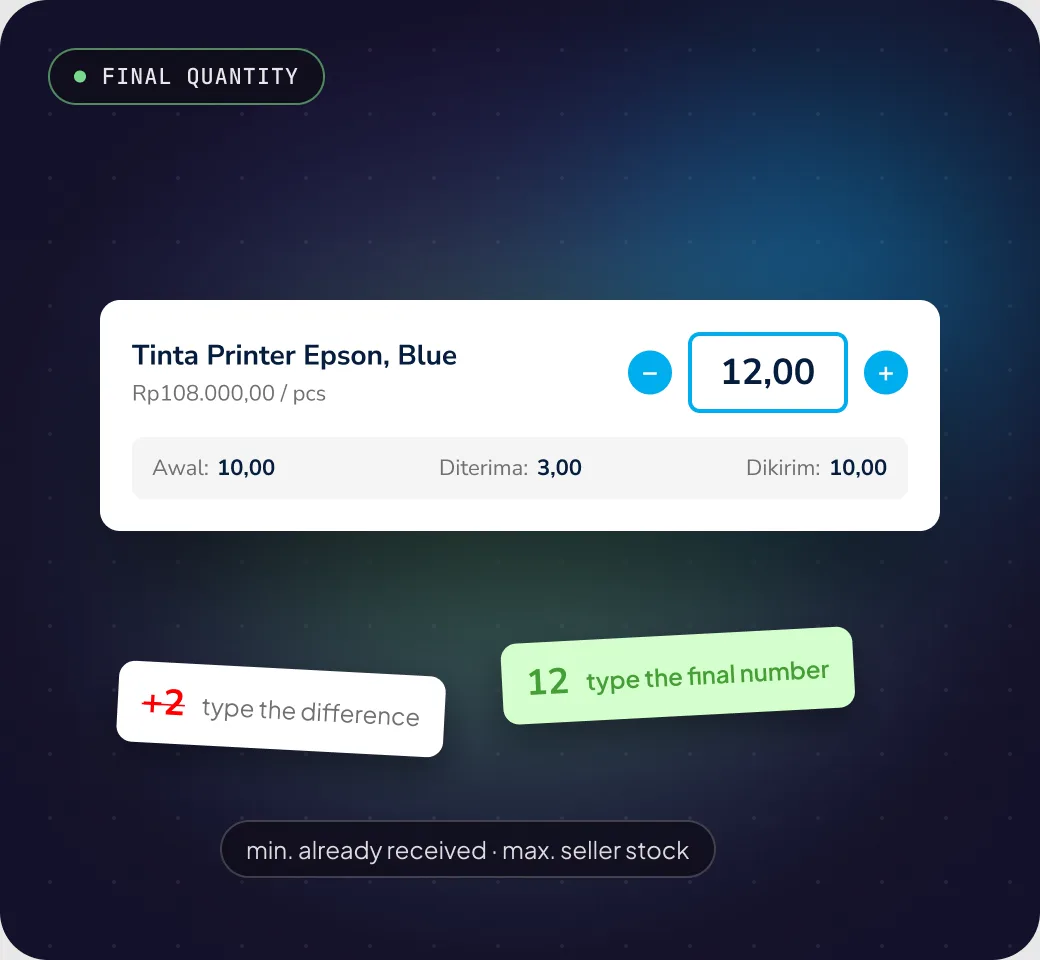
Type the final quantity, not the difference.

The call
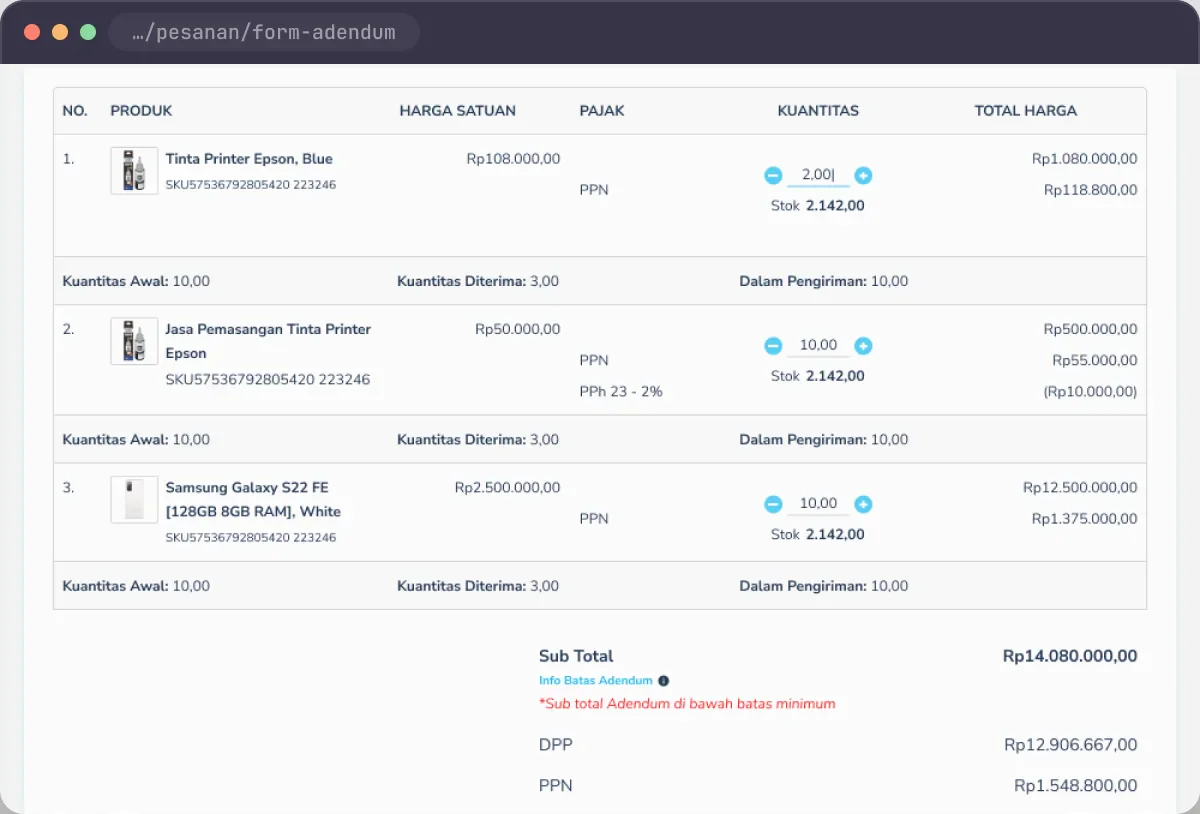
The quantity field takes the final number you want, with − and + buttons. The original, received and in-transit quantities sit right under each product.
Why
The PO, invoice and addendum document all record the final number. If buyers typed the difference, they’d have to do the maths, and it’s easy to mix up adding and reducing.
Trade-off
People used to thinking “add 2” need a moment to adjust. Showing the original quantity on every row, plus an example in the guide, helps.
Decision 1: Type the final quantity, not the difference.
02

Show the legal limit before people hit it.

The call
An “Addendum limit” hint next to the subtotal shows the maximum value. Go over it and a red message appears right there, and Continue locks.
Why
Perpres 46/2025 caps increases at 10%. It’s kinder to show people their room to move while editing than to reject them after they’re done.
Trade-off
The form gets denser. The limit lives in a tooltip and only gets loud when it’s broken.
Decision 2: Show the legal limit before people hit it.
03

Sellers just accept or decline.

The call
Sellers can’t edit the addendum. Order and invoice data only change once the seller accepts, within 3 working days. While it’s pending, other actions on the order are locked.
Why
Back-and-forth negotiation inside an addendum makes the status messy and hard to audit. One request, one decision, one trail.
Trade-off
If the seller wants a different number, they decline and the buyer sends a new request.
Decision 3: Sellers just accept or decline.
04

The document is generated, not uploaded.

The call
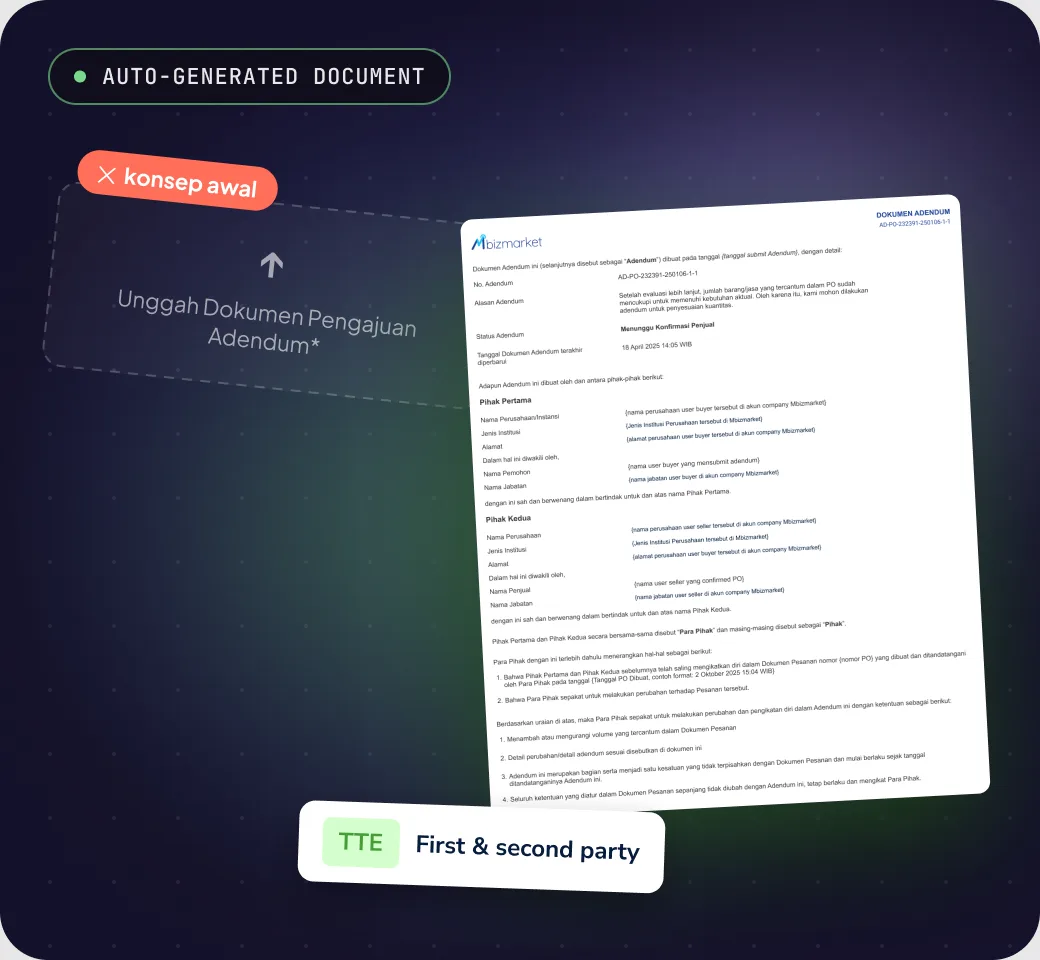
Once an addendum is sent, the system creates a document with both parties’ details, the changed items highlighted, an AD-PO-… number and e-signatures.
Why
In the early concept, buyers had to upload their own request document. That added a step outside the platform, and every file looked different. A generated document always matches the transaction.
Trade-off
Party details are locked when the addendum is sent, so company profiles have to be right before submitting.
Decision 4: The document is generated, not uploaded.
Process

From “just cancel it” to a change that’s safe for both sides.

A normal UX process, but every step was checked against order status, invoices and regulation.

Step 1

Understand

I mapped why buyers cancelled orders, and what happened to goods already shipped and invoices already issued.

Step 2

Map the flow

Buyer and seller flows with five addendum statuses, including the deadline and what’s locked while waiting.

Step 3

Design & prototype

One pattern across every touchpoint: buyer and seller web, mobile, admin panel, email and the printed document.

Step 4

Test & iterate

Failure scenarios checked one by one, especially things happening at the same time, then fixed before handoff.

Looking back
“Today Addendum only changes quantities. The pattern is ready for what comes next.”

The next most-requested changes are delivery schedule and price. The pattern can stay the same: a limit you can see from the start, one decision from the seller, and a document the system writes for you.

Screens

From the buyer’s form to a signed document.

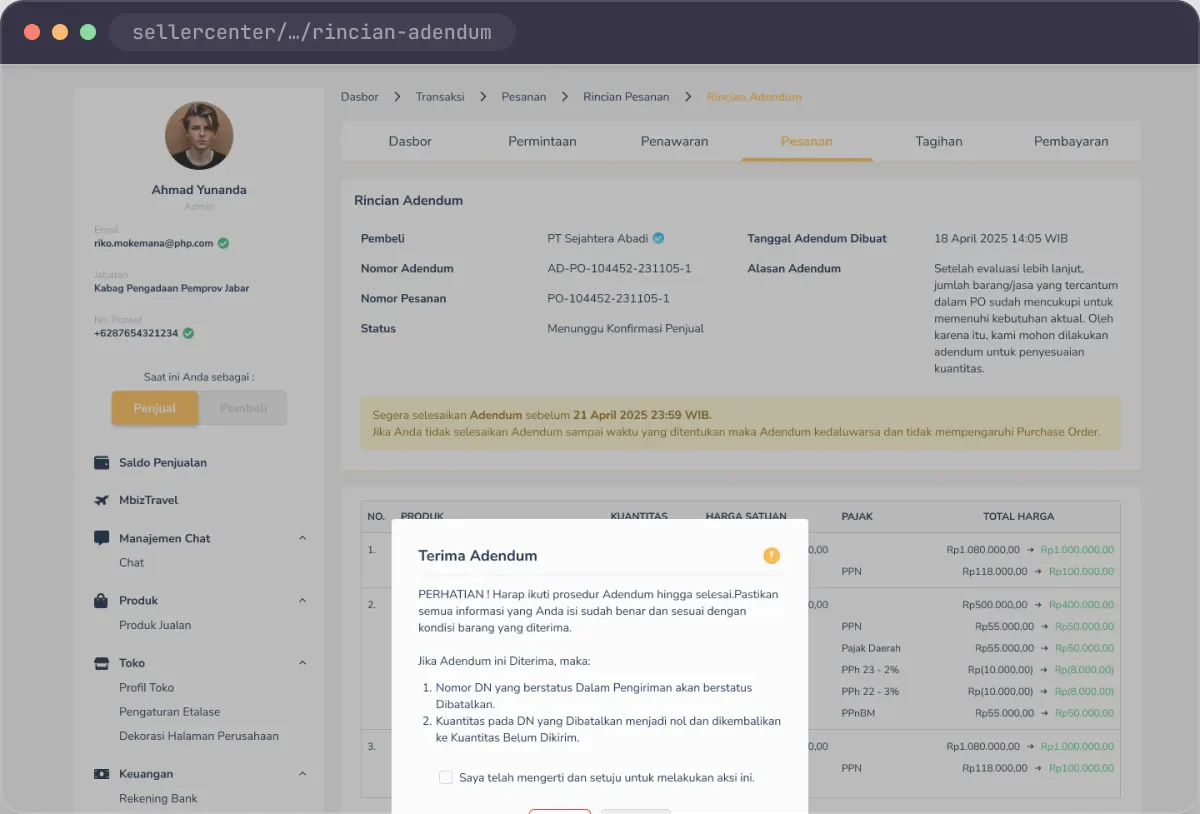
Real screens from the Addendum design file. All data is fictional.

Addendum form · buyer
01Addendum form · buyer
Responding · seller
02Responding · seller
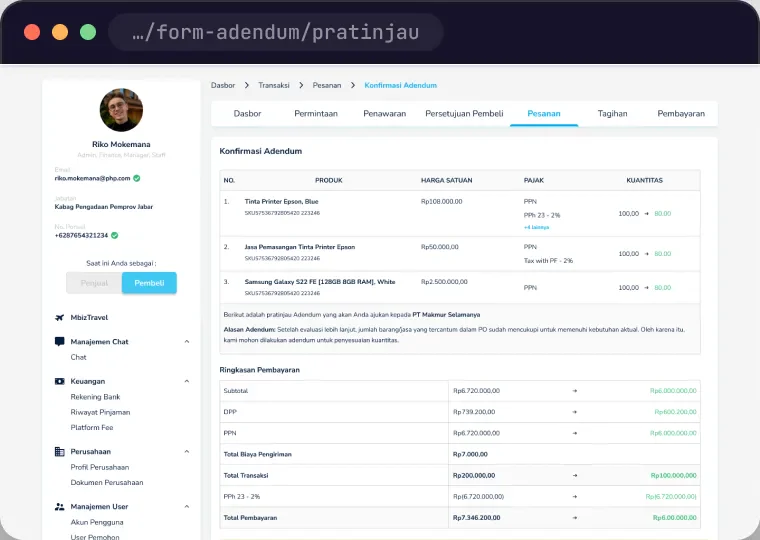
Preview before sending
03Preview before sending
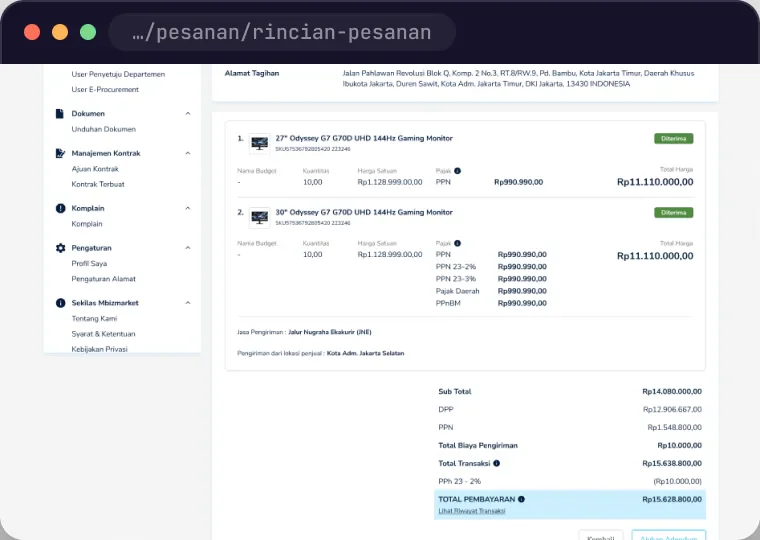
Agreed PO
04Agreed PO